
Total Snooker Classic Pro
Friendly MonsterSports
1.012.00 Reviews
- Version
- 1.10.0
- Installs
- 10.00K
- Age Rating
- Everyone
Screenshots
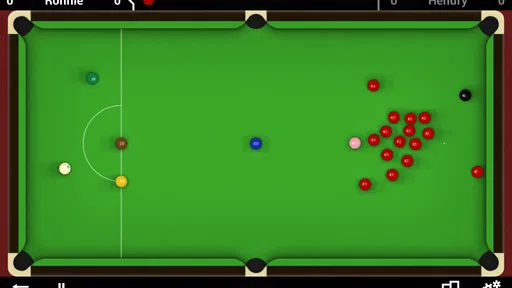
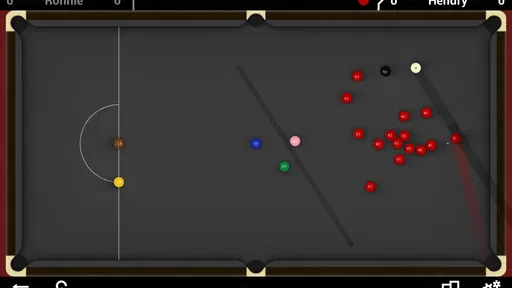
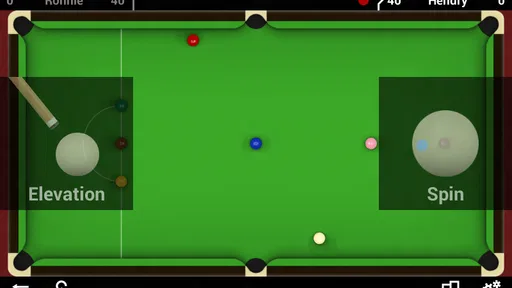
Our Review of Total Snooker Classic Pro
 Analysis by Appyee
I spent time with Total Snooker Classic Pro as a compact sports game built around one familiar idea: bringing a snooker table to an Android device and letting me play either against another person or against the computer. That simplicity is its main appeal. I do not have to learn a complicated career system or sort through a crowded menu before taking a shot. I can open it, line up the cue, and get straight into the rhythm of potting balls and planning the next position.
It is also a game that asks for realistic expectations. Friendly Monster released it on April 26, 2012, and the current version is 1.10.0, so this is not trying to compete with modern, presentation-heavy sports games. Its value is in the basic table experience rather than spectacle. The game is listed in the sports category, costs $1.99, and carries an Everyone age rating. For someone who wants a straightforward snooker game that can sit on a phone without demanding a large time commitment, that focus can be useful.
How a normal session feels from the first break
My baseline workflow is simple: start a match, take a moment to understand the table, and treat every shot as a small positioning problem rather than merely trying to sink the nearest ball. That sounds obvious, but it changes how the game feels. If I rush because a pot looks easy, I often leave the cue ball in an awkward place. If I first consider the next color or the safest side of the table, the same basic controls become much more satisfying.
The game works best in short, deliberate sessions. I can imagine using it during a break, on a journey, or while waiting for someone, especially when I want something more thoughtful than a quick arcade game. A single visit to the table can become a focused exercise in angle selection. I do not need to commit to a long campaign or remember a complicated roster. That makes the experience approachable for casual players, while experienced snooker fans can still create their own challenge by trying to build a clean sequence instead of taking isolated shots.
The two main ways to play also give the game a practical split. A match against the AI is useful when I am alone and want a repeatable opponent. Playing against a friend is better when the phone becomes a shared tabletop, with each person taking turns and judging the other player’s decisions. The friend option is especially appealing for people who already enjoy passing a device around for turn-based games. It does not need the same social commitment as an online competition, and that can be an advantage when the goal is simply to play together in the same room.
One habit improved my results more than any frantic adjustment: I stopped treating the cue ball as an afterthought. Before every shot, I look at where it is likely to finish and whether that position gives me a sensible continuation. Even when the game’s controls feel familiar, a successful pot is only half the job. A difficult follow-up can turn a good shot into a poor visit. This is the kind of repeatable routine that gives the small game more depth than its minimal presentation suggests.
Making the table readable before touching the cue
On a phone, the first challenge is not always the rules. It is seeing the table clearly enough to make a confident decision. I found it helpful to pause mentally before dragging or aiming and identify three things: the intended object ball, the pocket, and the cue ball’s likely path afterward. That short checklist prevents me from committing to a shot simply because the target appears close.
I also prefer to plan from the most constrained part of the table. If one ball is near a cushion or surrounded by traffic, I consider it before the open shots. Open balls are usually easier to revisit, while a cramped position may disappear after one careless contact. This approach is valuable in a touch-based game because it reduces unnecessary adjustments. Instead of constantly searching for a new target, I make one clear decision and then concentrate on executing it.
For a friend-versus-friend session, this habit creates a fairer and more interesting match. A player who only chases immediate pots may score quickly but leave poor positions. A player who thinks one shot ahead may score more slowly and still control the table. That difference gives the local mode its strongest human element: the game does not need elaborate social features when the table itself provides enough room for judgment, patience, and mistakes.
Settings and controls worth checking before serious play
I would not begin by assuming that the default setup is ideal for every phone or every player. The first useful step is to spend a few minutes checking how aiming, shot strength, and visual presentation feel on the particular screen. Small control differences matter in a game where a slight change in direction can decide whether a ball reaches the pocket or clips the cushion.
My preferred approach is to test the controls with low-pressure shots before starting a serious match. I check how quickly the aim responds, how easy it is to make a fine adjustment, and whether the shot-power movement feels predictable. This is not about searching for a secret advantage; it is about learning the game’s touch language. Once I know how far a normal gesture moves the cue and how much correction is practical, I can repeat the same motion instead of improvising every time.
Screen size changes the experience. On a smaller phone, precise aiming may feel more demanding because the table and controls compete for space. On a larger display, the table can be easier to inspect, but broad gestures may become less precise if I move too quickly. I would therefore adjust my physical grip and use smaller, slower movements rather than expecting the same gesture to work equally well on every device.
Another useful setting-related habit is to avoid changing several things at once. If the game offers more than one control or display choice, I would alter one option, take a few shots, and decide whether it genuinely helps. Changing everything together makes it difficult to understand what improved the experience. This matters particularly for a compact older title, where the best setup may depend more on personal comfort than on a universal recommendation.
I also keep the phone steady. That sounds basic, but it is an easy source of frustration during a delicate shot. Resting the device securely or holding it with both hands gives the aiming gesture a more consistent starting point. When I play against the AI, I can take the time to prepare. In a local match, I would agree with my friend not to move the phone during a turn, since consistency is more important than speed.
Repeatable routines that make ordinary shots easier
My most reliable routine is: identify the pocket, choose the contact point, check the cue-ball destination, then commit to the stroke. I do not keep re-aiming after every tiny doubt. Excessive adjustment often makes a simple shot less stable. Once the line looks reasonable, a controlled stroke is usually better than a last-second series of corrections.
I also separate practice from competition. Against the AI, I use early turns to learn how much force is needed for different table situations. Against a friend, I try not to experiment with every shot because a match is not the same as a practice table. This distinction helps answer an important practical question: the game is suitable for learning basic touch and planning habits, but it should not be treated as a perfect substitute for physical-table practice. A real cue, cloth, and table introduce sensations that a phone cannot reproduce.
For a quick everyday scenario, I might play one short session while waiting for a train. Rather than beginning with the expectation of finishing a long contest, I use the time to work on one repeatable goal, such as leaving the cue ball in a useful area after a successful pot. That keeps the session meaningful even if I have to stop suddenly. The game fits this kind of use better than a title that depends on long story progress or uninterrupted online play.
The same method helps when introducing the game to someone who does not already understand snooker. I would explain only the immediate objective, then encourage them to watch where the cue ball finishes. New players often focus entirely on the ball they are trying to pocket. Showing them the next-position idea makes the game easier to understand without turning the first match into a rules lecture.
Where experienced play becomes more demanding
The deeper challenge comes from controlling the visit rather than winning one exchange. A good player has to think about the next available shot, the risk of leaving an easy opportunity, and whether a safer decision is preferable to a low-percentage pot. These choices are especially noticeable against a computer opponent because the AI provides a consistent reference point. If I repeatedly lose after taking ambitious shots, the lesson is usually about decision-making rather than the basic act of aiming.
I found it useful to divide shots into three groups: routine pots, position shots, and recovery shots. Routine pots deserve a clean, confident stroke. Position shots require more attention to where the cue ball will travel. Recovery shots are the ones I take when the table has already become awkward, and they often call for restraint. This classification prevents me from using maximum confidence and maximum force on every situation.
One non-obvious trade-off is that playing more slowly does not always mean playing better. A careful routine helps with difficult angles, but overthinking an ordinary shot can make me lose the natural line. I try to reserve detailed analysis for shots that actually change the visit. That balance keeps the game from becoming tiring and makes the limited control space feel more manageable.
Another useful pattern is to favor routes that leave options. If two pockets appear available, I prefer the shot that keeps more of the table open for the next decision. A spectacular pot into a narrow area may succeed, but it can also trap the cue ball. In a small digital snooker game, this kind of self-imposed discipline is what creates a sense of mastery. The rules and presentation remain simple, yet the player can still improve through better choices.
Important limits before choosing this game
The low average rating of 1.0 from around 564 ratings is a serious warning sign for anyone who expects a polished modern sports simulation. I would not ignore that signal. At the same time, the rating alone does not tell me whether the game’s basic style suits a particular player. Someone looking for a small, old-fashioned snooker experience may judge it differently from someone expecting detailed physics, rich presentation, or a broad competitive ecosystem.
The install base is over 10 thousand, which reinforces the impression that this is a niche choice rather than a current mainstream sports title. That can be perfectly acceptable if I know what I am buying, but it makes the $1.99 price more consequential. I would recommend checking that the straightforward format is genuinely what you want before paying. If the main attraction is online competition, extensive customization, licensed presentation, or a large player community, a newer alternative in the sports category is likely a better fit.
There is also a clear platform limitation: the listed minimum operating system is Android 7.0. That makes it unsuitable for devices below that requirement, regardless of how appealing the game sounds. For a compatible phone, the Everyone rating makes it broadly approachable, although younger players may still need help understanding the difference between simply potting a ball and planning the cue ball’s next position.
I would also skip it if I want a game that teaches snooker from the ground up. The basic table format can support learning through repetition, but a dedicated tutorial-focused title may explain rules, tactics, and aiming concepts more clearly. Similarly, players who dislike turn-based local play may find the friend mode less convenient than a game designed around network matches. The choice depends on whether the priority is a simple shared table or a more feature-rich competitive service.
My verdict after settling into its rhythm
My final view is that Total Snooker Classic Pro is a narrow recommendation, but not a meaningless one. Friendly Monster’s game has a clear identity: a paid Android snooker title for people who want direct matches against the AI or a friend, without the weight of a modern sports package. I enjoyed it most when I approached each visit as a sequence of decisions and used the same aiming routine from shot to shot.
The strongest reason to consider it is convenience. I can turn a spare few minutes into a focused table session, practice cue-ball awareness, or challenge a nearby friend without needing a large setup. The strongest reason to hesitate is its age and the very poor average rating. Those are not minor details. They mean I would choose it only for its basic snooker premise, not because I expect current production values or a deep catalogue of modes.
If you are new to digital snooker, begin with gentle shots, watch the cue ball more than the score, and use AI matches to build a consistent routine. If you already play snooker, treat the game as a lightweight touch-and-planning exercise rather than a complete simulation. And if you want online competition, detailed instruction, or a modern presentation, spend your $1.99 elsewhere. The right reason to install this game is its focused table experience, not the promise of a full sports platform.
Verdict
Strengths of Total Snooker Classic Pro
- Realistic snooker physics make positional play feel rewarding.
- Multiple table layouts provide variety beyond standard matches.
- Practice mode helps improve aiming, cue control, and shot planning.
- Simple controls are easy to learn on both phones and tablets.
- Offline play lets you enjoy matches without an internet connection.
Limitations of Total Snooker Classic Pro
- Limited multiplayer options may disappoint players seeking online competition.
- The interface feels dated compared with newer snooker games.
- Advanced shots can be difficult to perform accurately on smaller screens.
- Match pacing may feel slow for players who prefer faster arcade gameplay.
- Some features may require payment or offer less content in the free version.
Similar Picks in This Category
View All
8 Ball Pool
Miniclip.com4.8

Pooking - Billiards City
AIM TOP GAME TECHNOLOGY LIMITED - pool4.6

Carrom Pool: Disc Game
Miniclip.com4.4

EA SPORTS FC Soccer Mobile 26
ELECTRONIC ARTS4.6

World Soccer League
mobirix4.3

Soccer Cup 2026: Football Game
INLOGIC SPORTS - football tennis golf soccer4.3
Frequently Asked Questions
What is Total Snooker Classic Pro?
Total Snooker Classic Pro is a mobile snooker game designed for players who enjoy realistic table sports on Android or iOS. It focuses on classic snooker rules, cue control, ball positioning, and tactical play rather than fast arcade action. After trying it, the game feels best suited to users who appreciate careful aiming, planning several shots ahead, and gradually improving their accuracy through practice.
Is Total Snooker Classic Pro suitable for beginners?
Yes, beginners can play Total Snooker Classic Pro, although the controls may require some adjustment at first. New players need to learn how to control the cue direction, power, spin, and shot timing. The game becomes more enjoyable once these mechanics feel familiar. Players with previous snooker or pool experience will probably adapt faster, but patient newcomers can also make steady progress.
Does Total Snooker Classic Pro require an internet connection?
The basic gameplay experience may be available without a constant internet connection, which is convenient for playing during travel or when mobile data is limited. However, certain features can depend on the version installed, including advertisements, online competitions, updates, leaderboards, or other connected services. It is advisable to check the store listing and test the game offline before relying on it without internet access.
Are there in-app purchases or advertisements in Total Snooker Classic Pro?
The presence of advertising and optional purchases can vary according to the platform, region, and specific release of Total Snooker Classic Pro. Some versions may display ads between matches or offer paid options connected with gameplay or customization. Before downloading, users should review the Google Play or App Store payment information carefully, especially if the device is shared with children or has purchasing enabled.
What devices are recommended for playing Total Snooker Classic Pro?
Total Snooker Classic Pro should run on many modern Android and iOS devices, but the smoothness of play depends on the phone or tablet’s operating system, processor, memory, and available storage. A newer device generally provides more responsive controls and fewer performance issues. Before installing, confirm the required operating-system version, download size, permissions, and compatibility shown on the official store page.
Play our best games!


